How to ask for a Google review on WhatsApp
Message templates, timing and safeguards to ask for Google reviews on WhatsApp without hurting the customer relationship.
Why WhatsApp works so well
WhatsApp is direct, fast and familiar. When used carefully, it can be one of the best channels to request Google reviews. The customer is already on the phone, already talking to the business and can open the review link immediately.
That same efficiency requires restraint. A message sent at the wrong time can feel intrusive.
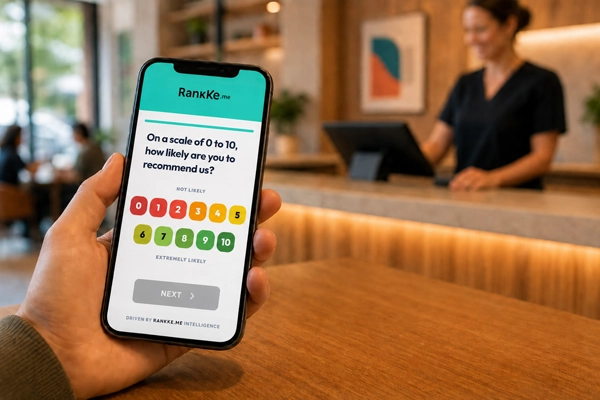
Send it after value is delivered
Good moments include completed service, successful delivery, a customer compliment, a high NPS response or a solved support case. Avoid asking before the experience is complete.
A short template
Hi, [name]. We were happy to serve you. If you can leave a Google review, it helps other people discover our work: [link]
This message is clear, polite and direct.
Where Rankke.me fits in this strategy
A direct Google review link is useful, but sending it to every customer is not always the safest strategy. The link removes friction, but it also removes context. If an unhappy customer receives that link before the company understands the problem, the business may be guiding dissatisfaction straight into a public channel.
Rankke.me works one step before the Google review. The customer first enters a controlled reputation flow, answers a satisfaction question and reveals whether the experience was positive, neutral or negative. When the answer indicates satisfaction, the platform can guide that customer to Google with a clearer and more relevant request. When the answer indicates risk, the company can open a private recovery path instead of encouraging a public complaint.
This does not replace the Google Business Profile. It protects it. Google remains the visible trust point, while Rankke.me helps decide when and how to invite customers to contribute there. The result is a more consistent flow of positive reviews and less chance of turning unresolved frustration into visible damage.
For local businesses, this distinction is important. Reputation growth is not only asking more often. It is asking the right people, at the right moment, after listening first.
How to use the article in a conversion workflow
The practical conversion opportunity is to stop treating review requests as isolated messages. A business should know who receives the request, which experience triggered it, which channel delivered it and what happened afterward. Without this structure, the team may celebrate a few new reviews while missing unhappy customers who needed attention.
A safer workflow has three stages. First, listen privately with a satisfaction question. Second, separate customers by risk and enthusiasm. Third, guide satisfied customers to the public review page while routing dissatisfied customers to recovery. This protects the brand and creates a healthier review profile over time.
The result is more than a better rating. The company creates a visible proof system that supports sales, local search, paid media, referrals and the trust needed for a new customer to choose the business.
After a compliment
Great to hear that, [name]. Thank you for the feedback. If you can share this experience on Google, it helps our team a lot: [link]
This turns private praise into public trust without forcing the customer.
What not to do
Do not send repeated reminders. Do not ask for a specific score. Do not offer discounts for reviews. Do not send long audio instructions. The request should feel light.
Build a simple message sequence
A good WhatsApp process can have three templates: one after a completed experience, one after a spontaneous compliment and one after a high NPS score. Each template should be short, contextual and optional.
Avoid turning the sequence into a campaign. Reputation grows through trust. If the customer feels pressured, the request may hurt the relationship even if it generates one review.
Timing and frequency
Send messages during reasonable business hours unless your business naturally operates at night or on weekends. WhatsApp is personal, so timing affects perception.
Frequency limits are also important. A customer should not receive multiple review requests in a short period. If they do not respond, one gentle reminder may be enough in some cases. More than that often feels intrusive.
Train the team to read signals
The team should know when to ask and when to wait. A compliment is a strong signal. A solved issue can be a good moment. An unresolved complaint is not.
Use real anonymized examples in training. Show conversations where the request fits naturally and conversations where recovery should come first.
Practical templates for different moments
After a completed service, keep the message simple and focused on gratitude. After a compliment, reference the compliment naturally. After a high NPS score, thank the customer for the score before offering the review link.
The message should always include the link in the same text. If the customer needs to ask where to review, the process already created friction.
How to handle replies
If the customer says they reviewed the business, thank them and move on. Do not ask for a screenshot or pressure them to confirm the rating. If the customer replies with a complaint instead, pause the review request and move into recovery.
This flexibility is what makes WhatsApp effective. It is a conversation channel, not only a broadcast channel.
Quality control for WhatsApp requests
Review a sample of conversations every week. Check whether the request was sent at the right time, whether the tone matched the relationship and whether customers complained about the contact. This keeps the process human even when templates or automation are used.
If a message starts to sound too mechanical, adjust it. The best WhatsApp review requests feel like a natural continuation of the service, not a marketing blast.
How to turn this topic into a routine
For a local business, this topic is practical. A customer chooses with the information they can see: reviews, comments, photos, clear services, recent replies and the feeling that other people had a good experience. These details work together to create trust before the first contact.
The first step is to map where the company appears: Google, website, social profiles, directories, marketplaces, location pages and institutional materials. Then check whether the message is consistent everywhere. A business can deliver a strong experience and still lose trust when public information looks incomplete or contradictory.
Metrics to monitor
Track what a manager can actually use: how many new reviews arrive, what customers praise, what complaints repeat, how fast the team replies and whether more people call, book, ask for directions or place orders after seeing the business online.
These indicators show whether the business is merely visible or whether it is building enough authority to be remembered, compared and recommended.
A practical 30-day plan
In week one, review the main digital presence points. In week two, organize replies and review requests. In week three, create or improve content that explains services, differentiators and common questions. In week four, compare signals before and after: reviews, comments, searches and contacts.
Progress comes from repetition. Strong reputation is built when the company turns good experiences into public evidence that is easy to find.
Mistakes that reduce impact
The most common mistake is caring about reputation only when criticism appears. Another is publishing generic content unrelated to real customer doubts. It is also risky to ignore positive reviews, because they show which promises the company already fulfills.
Rankke.me helps connect satisfaction, reviews and reputation in a simple routine for local teams and multi-location operations.
Frequently asked questions
Can I send the link to all contacts?
It is better to send it to customers with a recent experience. A broad blast may feel like spam.
Should I automate the message?
Yes, if automation uses timing and context.
Is text better than audio?
Text is usually better because it is quick and includes the clickable link.