Google review link: how to create it, use it and increase replies
Learn how a direct Google review link reduces friction across WhatsApp, QR codes, email and satisfaction flows.
What a Google review link is
A Google review link is a direct URL that sends customers to the review screen of your Business Profile. Instead of asking people to search for your brand and find the review button, you give them the path ready.
This small detail changes results. Happy customers are often willing to help, but only if the effort is low.
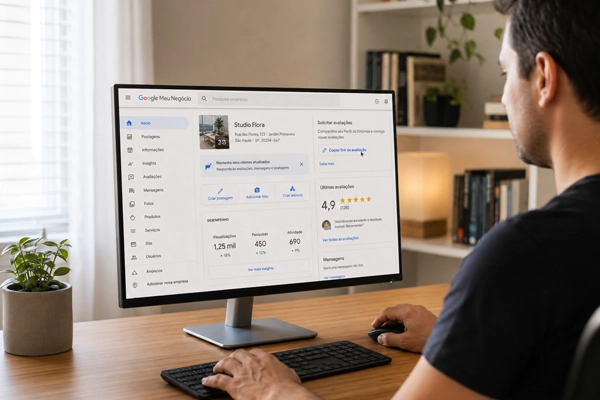
Where to use the review link
The link can be used in WhatsApp messages, emails, SMS, QR codes, post-service pages and satisfaction survey flows. The important point is context. The link should appear after the customer has had a concrete experience to comment on.
Add context to the link
Avoid sending only the URL. A short sentence improves trust and response.
Thank you for choosing us. If your experience was positive, your Google review helps other people find our work: [link]
Where Rankke.me fits in this strategy
A direct Google review link is useful, but sending it to every customer is not always the safest strategy. The link removes friction, but it also removes context. If an unhappy customer receives that link before the company understands the problem, the business may be guiding dissatisfaction straight into a public channel.
Rankke.me works one step before the Google review. The customer first enters a controlled reputation flow, answers a satisfaction question and reveals whether the experience was positive, neutral or negative. When the answer indicates satisfaction, the platform can guide that customer to Google with a clearer and more relevant request. When the answer indicates risk, the company can open a private recovery path instead of encouraging a public complaint.
This does not replace the Google Business Profile. It protects it. Google remains the visible trust point, while Rankke.me helps decide when and how to invite customers to contribute there. The result is a more consistent flow of positive reviews and less chance of turning unresolved frustration into visible damage.
For local businesses, this distinction is important. Reputation growth is not only asking more often. It is asking the right people, at the right moment, after listening first.
How to use the article in a conversion workflow
The practical conversion opportunity is to stop treating review requests as isolated messages. A business should know who receives the request, which experience triggered it, which channel delivered it and what happened afterward. Without this structure, the team may celebrate a few new reviews while missing unhappy customers who needed attention.
A safer workflow has three stages. First, listen privately with a satisfaction question. Second, separate customers by risk and enthusiasm. Third, guide satisfied customers to the public review page while routing dissatisfied customers to recovery. This protects the brand and creates a healthier review profile over time.
The result is more than a better rating. The company creates a visible proof system that supports sales, local search, paid media, referrals and the trust needed for a new customer to choose the business.
Combine it with satisfaction surveys
A stronger strategy is to ask for satisfaction first. When customers respond positively, they can be invited to leave a public Google review. This protects the relationship and makes the request feel natural.
Track performance
Monitor how many reviews are generated, which channels work best, the average rating and the themes customers mention. Then refine message timing and channels.
How to diagnose low conversion
If the link is being sent but reviews are not growing, check the whole path. Open the link on a phone outside the company account and confirm that it leads to the right review screen. Then review the message. A bare link can feel suspicious, especially if it comes from a number the customer does not recognize.
Timing also matters. A customer who just opened a support request is not in the same mindset as a customer who just complimented the team. The same link can perform very differently depending on context.
QR code best practices
QR codes work best in physical environments when the experience has already happened. Use them at checkout, reception after service, packaging or printed material delivered at the end of the job.
Do not rely on the code alone. Add a short sentence explaining why the review matters. Also test size, contrast and distance. A QR code that is hard to scan creates friction.
Measure channels separately
Even if the final review link is the same, track where the request came from: WhatsApp, email, QR code, SMS, survey follow-up or in-person service. This helps you decide where to invest effort.
You may find that WhatsApp generates more volume, while email generates longer comments. The right decision depends on the data.
Governance for multiple profiles
Companies with more than one location need a controlled list of review links. Each unit should have its own verified URL, owner and reporting view. If one team accidentally sends customers to the wrong profile, the data becomes unreliable and customers may review the wrong place.
Keep a simple internal document with the profile name, city, review link, responsible person and last validation date. Review it whenever a unit moves, changes its phone number or updates Google Business Profile access.
What to do after the review arrives
The link is only the beginning. Once a customer leaves a review, the business should answer it publicly, tag any useful insight and watch for recurring themes. A good review can inform sales copy. A critical review can reveal a process issue.
This is how a review link becomes part of a reputation system instead of a one-off tactic.
Operational checklist
Before sharing the link at scale, confirm five things. The profile is the correct one. The link opens on mobile. The message explains why the review matters. The customer receives it after a real experience. The team knows who will answer new reviews.
This checklist prevents simple mistakes from becoming reputation problems. A review link is easy to create, but the process around it determines whether it becomes a growth channel.
How to turn this topic into a routine
To apply Google review link: how to create it, use it and increase replies without improvisation, define the moments when customers are most likely to be satisfied. This may happen after a completed delivery, a well-rated appointment, a resolved support case, a repeat purchase or a positive answer in a satisfaction survey.
From there, the review request should be simple, direct and contextual. The customer needs to understand why their opinion matters, receive an easy link and never feel pressured. The less friction there is, the easier it becomes to turn real satisfaction into a public review.
Metrics to monitor
Track new reviews per week, average rating, rating distribution, response speed and recurring themes. Also check whether recent reviews reflect the company's current experience. A profile with many old reviews may look strong, but an active profile creates stronger confidence.
Another important metric is invitation coverage. If many satisfied customers never receive a request, the business loses social proof every day.
A practical 30-day plan
In week one, review the Google review link and sending channels. In week two, choose the best request moments and write messages for each context. In week three, organize replies for praise and criticism. In week four, analyze received comments and turn patterns into internal actions.
This process creates a light routine: ask at the right moment, reply carefully and learn from what appears publicly.
Mistakes that reduce impact
Avoid buying reviews, offering rewards, asking only friends or telling customers which score to give. Besides damaging trust, these practices can create risk for the company profile.
Rankke.me helps prioritize satisfied customers, reduce request friction and keep reputation management ethical and measurable.
Frequently asked questions
Can I use the same link everywhere?
Yes, if it points to the correct profile. Still, measuring channels separately is useful.
Does the link work on mobile?
Yes. Mobile use is one of its main advantages, especially through WhatsApp.
Do QR codes work?
They can work well in physical experiences when placed at the right moment.